


GPS Location Flow & Tracker
4.054.00 Reviews
App Specs
- Version
- 1.2.0.0
- Updated On
- License
- Free
- Downloads
- 100,000+
- Developer
- Karyaku Dev
- Categories
- Maps & Navigation
- Platform
- Android
Screenshots
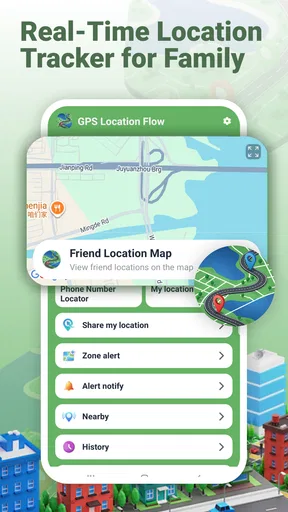
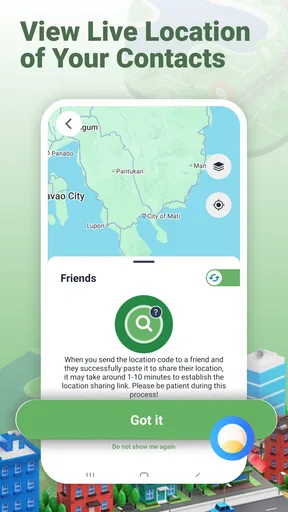
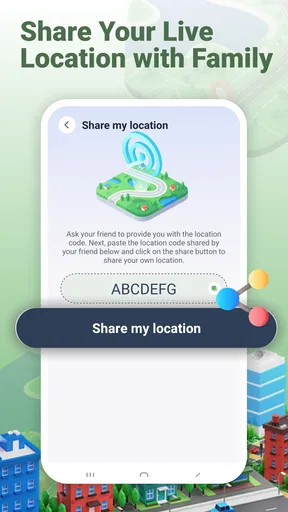
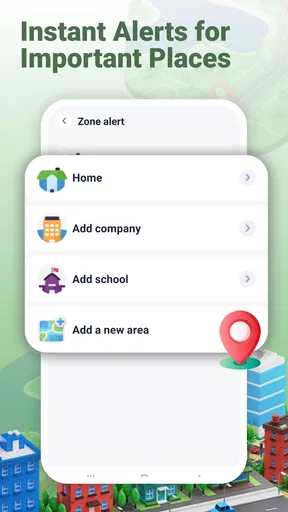
 Analysis by AppCompare
Before choosing a location-sharing tool, I’d separate two needs that often get mixed together: finding a route and coordinating with people. GPS Location Flow & Tracker is built around the second. I’d consider it when the recurring question is whether someone has reached an agreed area, or when a group needs a shared view to meet up. I wouldn’t choose it simply because I want another general-purpose map on my phone.
That distinction is useful before anyone installs it. A location app only helps when the people involved agree on how to use it, and the map itself cannot explain a delay or guarantee that a phone will keep reporting its position. I’d start with one everyday problem, then decide whether location sharing is a better solution than the messages or maps the group already uses.
What to decide before installing
I’d decide first whether the people involved have a recurring coordination problem that a shared location view could genuinely simplify. A useful trial starts with one clear purpose and an agreed boundary for when sharing is welcome, rather than turning the app into a default check-in habit. That gives you a fair way to judge whether its alerts and shared view suit your group better than the tools you already use.
Choose it for coordination, not route planning
The app sits in the Maps & Navigation space, but its central purpose is sharing and checking locations. If your main question is “Where is my family member?” or “Has someone reached the area we agreed on?”, its focus makes sense. If you mainly need traffic-aware directions, saved places, or detailed trip planning, a conventional maps app is likely the better starting point.
Before inviting anyone, decide what a useful setup looks like. You might want to check a person’s location only when plans change, or you might want an area alert to replace repeated “I’m here” messages. These are different habits. I recommend agreeing on who will share, which places matter, and when an alert would actually help. That small conversation prevents the app from feeling like an unexplained tracking request.
Also consider how the group handles phones and connectivity in ordinary life. Live location depends on a device being available and able to report its position; a map should not be treated as proof that someone is safe or as a guaranteed real-time account of their movements. If a person’s phone is off, out of battery, or otherwise unable to update, a location view may not answer the question you have.
Where GPS Location Flow makes the most sense
The strongest case for GPS Location Flow & Tracker is a small group with recurring coordination needs. A family might use it to check whether someone has arrived near an agreed destination, while friends meeting across a busy area might use location sharing to find one another without exchanging a stream of directions. The app’s combination of live viewing and area alerts is more relevant to those situations than to someone who only wants a map on their own phone.
Worth Reading Before You Choose

EA SPORTS FC Mobile 26 Is a Bigger Football Game, but It Takes Time

Flipboard Shows What News Apps Must Do Beyond the Feed

Switching to Android Auto Means Rethinking Your Driving Routine

Google Calendar Makes a Crowded Week Easier to Manage

Ludo King Makes the Most of the Minutes Between Plans

Baby Panda World Brings Quick Play to Modern Phones, but Its Game Library Feels Busy
One realistic routine is a parent and an older child agreeing on an alert around a familiar place, such as the school area. Instead of asking for a message every time the child arrives, the family can use an area-based notification as a prompt to check in when needed. The important detail is to set the expectation together: the alert supports communication; it does not replace it. An alert can reduce routine back-and-forth, but it cannot explain delays or unusual circumstances.
Another useful approach is to reserve live viewing for a specific coordination window. If friends are trying to meet after arriving separately, sharing a location for that occasion can be more purposeful than leaving a group’s location-sharing routine undefined. I find that framing helps keep the tool practical and makes it easier for each person to decide whether they want to participate.
The developer is Karyaku Dev. The app is free, has a 4.0 average from around 292 ratings, and has passed 100K installs. Those figures suggest that people are trying it as a focused location tool, but they do not tell me whether it suits a particular household. I would judge it by the fit between its sharing and alert approach and your group’s actual routine, rather than by popularity alone.
Area alerts are useful only when they reduce effort
An area alert can be more helpful than repeatedly opening a map, but only when the area corresponds to a meaningful event. Think “arrived near the agreed meeting point,” not “notify me about every movement.” If you create alerts around places that do not change what anyone does, they add noise rather than value. Start with one important routine, see whether it makes coordination easier, and expand only if the group finds it genuinely helpful.
There is also a human trade-off. Location sharing can make a family feel more connected, but it can also feel intrusive if one person assumes the app should always be on. I would make sharing voluntary and explicit, especially with teenagers, relatives, or friends. A tool meant to reduce check-in messages works best when people trust the arrangement, not when they feel monitored.
For a practical first test, use the app during a normal outing rather than relying on it for a high-stakes trip. Agree on a place, check whether the shared view helps, and notice whether the area alert fits the moment. That gives you a low-pressure way to learn whether this style of coordination is actually more convenient than a text.
When another kind of app is a better fit
If you need detailed navigation, choose a mapping app built around routes and directions. GPS Location Flow & Tracker is not the option I would open first for comparing alternative routes or planning a long drive. You can still use a navigation app for the journey and a location-sharing tool for coordinating with people, but keeping those jobs separate may be simpler than expecting one app to handle both equally well.
If your group already uses a messaging app with location sharing and that feature covers occasional meetups, adding another app may create more friction than it removes. A dedicated tool is more compelling when location checks or area-based alerts are part of a repeated routine. For one-off plans, sending a message or sharing a location through a familiar service may be enough.
It is also not the right choice for someone who wants to track a person without their knowledge or agreement. The sensible use case is shared coordination among people who understand the arrangement. If your priority is privacy and you do not want location sharing in your daily routine, there is no need to install a tracker just because it could be useful in theory.
Families who require a dependable safety process should keep other steps in place, too: clear check-in expectations, a way to contact one another, and a plan for what to do if a phone cannot be reached. A location app can support that process, but it should not become the process itself. That is a meaningful limit, not a reason to dismiss the app; it simply sets the right expectations.
What switching involves in everyday use
Trying the app is easy to justify because it is free, but switching habits still has a cost. Everyone who needs to participate must be willing to use the same arrangement, and a new app can be forgotten if it does not solve a recurring problem. Before moving a whole family routine over, choose one task—such as meeting after separate journeys—and see whether the shared location and area alerts make that task easier than your current messages.
Keep the first setup deliberately small. Invite only the people who need to coordinate, agree on when sharing is appropriate, and avoid creating alerts for every place someone visits. This is a useful, non-obvious way to prevent notification fatigue: make each alert answer a real question, such as whether someone has reached the agreed area. If it does not change what you do next, it probably does not need to be an alert.
If the app does not fit, switching back to your existing map or messaging routine should be straightforward in principle: stop relying on the new workflow and use the method your group already understands. The harder part is usually not changing software; it is getting everyone to agree on a consistent check-in habit. I would not move a well-functioning group to a new tool unless location checks are currently causing repeated confusion or unnecessary messages.
Compatibility and expectations
GPS Location Flow & Tracker is listed at version 1.2.0.0 and requires Android 9 or later. It is rated for Everyone. Those details make it easier to judge basic suitability: an older Android device below that minimum will not meet the stated requirement, and families should still consider whether each person is comfortable using a location-sharing app regardless of age rating.
As with any live-location tool, I would check how it behaves in your own routine instead of assuming that “real time” means uninterrupted updates in every circumstance. A quick test while everyone is together can reveal whether the app is easy for the group to understand and whether alerts are useful enough to keep. I would not make it the sole way to confirm someone’s arrival until the people involved have tried it and know what to do if an update is unavailable.
One further tip is to treat location as context, not a complete explanation. Seeing that someone is near a destination may help you decide whether to wait or send a message, but it does not tell you why they have stopped or whether plans have changed. Pairing the map with a brief, respectful message is often more considerate than drawing conclusions from a dot on a screen.
My recommendation
I would recommend GPS Location Flow & Tracker to families or small groups who want a shared location view and find area-based alerts useful for recurring plans. It is especially worth a trial if arrival check-ins create needless messages and everyone involved agrees on how sharing will work. The combination of live location and alerts gives it a clearer role than a generic map app when the real problem is coordinating people.
I would skip it if you only need directions, already have a comfortable way to share locations for occasional meetups, or do not want the social responsibility of managing ongoing location sharing. It is also a poor fit if anyone expects it to guarantee safety or explain every delay. In those cases, a regular navigation or messaging app—or simply a direct check-in—may be the more appropriate choice.
Overall, GPS Location Flow & Tracker looks most useful when a group gives it a narrow, agreed purpose rather than treating it as a permanent window into everyone’s movements. Try one routine, keep alerts meaningful, and pay attention to whether the app genuinely reduces coordination effort. If it does, it can earn a place in your family’s toolkit; if it adds more monitoring and notifications than convenience, there is little reason to force the switch.
A low-pressure way to test the fit
I’d make the first trial deliberately ordinary: choose a meeting people already expect to attend, have each participant decide whether to share, and use the app only to solve the practical question of where to regroup. For example, if two family members leave a community event separately, an agreed shared view may save several “which entrance?” texts. Afterwards, ask whether it actually made the handoff easier. That small review is more informative than keeping the app simply because it is installed.
Another useful decision is whether the app should be a routine tool or an occasional one. If area alerts help with a repeated arrival check, a stable routine may make sense. If the need comes up only once in a while, opening a familiar messaging app and sharing a location for that moment may be less work. The right choice is the one that fits how your group already communicates, not the one with the most ambitious setup.
Privacy and practical boundaries
Before sharing, I’d make sure everyone can say what they are agreeing to in plain language: who can see a location, for what purpose, and whether sharing is expected only during a particular plan or as part of a recurring routine. If those terms feel awkward to discuss, that is a sign to pause rather than quietly turn location sharing into a default. A shared map works best as a convenience people can understand and accept.
There is also a difference between an area alert and a confirmed handoff. An alert can help someone notice that a person has reached a relevant area, but the person may still need to call, enter a building, or change plans. For school pickups, appointments, or meeting someone in a crowded venue, I would keep a direct contact method available and agree on a simple fallback if no update appears. That modest backup keeps the tool in its proper role.
Who is likely to appreciate it
This app is most appealing to households and small groups that can name a recurring coordination problem and are comfortable discussing location sharing openly. It may be especially handy when arrival updates are frequent enough to become a nuisance, yet not important enough to justify a complicated safety system. People who value a lightweight shared view and can keep alerts selective are the ones most likely to find the trade-off worthwhile.
By contrast, someone who mainly travels alone, needs robust route planning, or dislikes location sharing should probably stay with a conventional map or direct messages. The same goes for groups whose members use different habits and are unlikely to check a new app consistently. The app cannot create cooperation on its own; if a group will not agree on the routine, its central convenience disappears.
That is why I’d judge GPS Location Flow & Tracker less by how often I can open it and more by whether it makes one agreed task calmer and clearer. If it replaces repeated arrival texts without creating a sense of surveillance, it has a worthwhile niche. If the group keeps checking the map but still has to send the same messages, the extra step is not earning its place.
Pros
- Clear map view makes it easy to check a location at a glance.
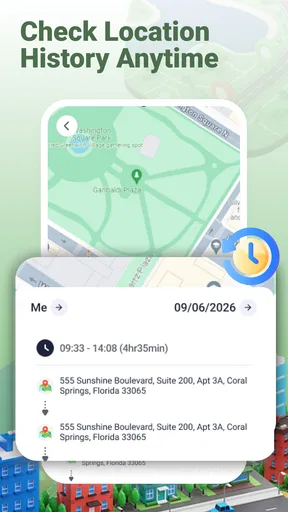
- Location history can help retrace places visited during a trip.
- Useful for coordinating meetups when everyone shares their location.
- Can provide context about places and routes
- beyond basic coordinates.
- Handy for keeping track of a device or family member with their consent.
Cons
- Location sharing may raise privacy concerns if permissions are too broad.
- Frequent GPS updates can drain battery life.
- Tracking accuracy may drop indoors or in areas with weak GPS signals.
- Some features may require a paid plan or in-app purchases.
- Background tracking may be limited by battery-saving settings or OS permissions.
FAQs for GPS Location Flow & Tracker
What is GPS Location Flow & Tracker used for?
GPS Location Flow & Tracker is designed to help you view location information and follow movement recorded by your device. Depending on the features available in your version, it may display a position on a map, show a route or location history, and provide tools for tracking journeys. Check the app’s current listing and in-app descriptions before downloading, as features can vary by platform and release.
Does GPS Location Flow & Tracker need internet access and GPS to work?
For accurate location readings, the app generally needs location services enabled and permission to access your device’s location. GPS can determine your position outdoors, while an internet connection may be needed to load maps or related online content. Availability and accuracy can vary indoors, in dense urban areas, or when signal is weak. Some functions may be limited when you are offline.
Does the app track my location continuously, including in the background?
Location tracking behavior depends on the permissions you grant and the app’s settings. If you enable background location access or start a tracking session, your device may continue collecting location data when the app is not on screen, which can affect battery life. Review the permission prompts and privacy information, and disable background access or tracking when you do not need it.
Is GPS Location Flow & Tracker free, and are there in-app purchases or ads?
Pricing, advertising, and optional purchases can differ between the Android and iOS versions and may change over time. Before installing, review the app’s store page for its current price, in-app purchase details, subscription terms, and advertising disclosures. If an optional paid feature is offered, check its cost and renewal conditions carefully so you know what to expect before confirming a purchase.
How accurate is GPS Location Flow & Tracker, and can I rely on it for safety?
Location accuracy depends on your device’s GPS hardware, signal conditions, permission settings, and the app’s configuration. A displayed position or recorded route can be delayed or imprecise, especially indoors or where GPS reception is obstructed. Treat the app as a convenience rather than a guaranteed safety or emergency service, and use a dedicated emergency feature or contact local authorities when necessary.


